



Visitors to Gelman can access GW libraries' e-resources, including e-books and databases, by following the instructions below.
Access to e-resources using the E-Resources Account for Visitors is available for both personal computers and public computers in Gelman. These accounts ONLY work inside Gelman Library.
- Request an E-Resources Account for Visitors at the Gelman Check Out Desk.
- If you are using a personal device*, ensure you are logged onto GWguest wifi. PLEASE NOTE: Credentials for logging into the GWguest wifi are not the same as your E-Resources Account for Visitors.
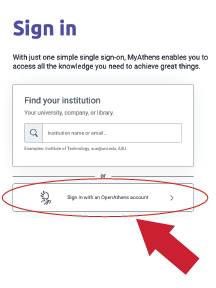
- Go to my.openathens.net and select "Sign in with an OpenAthens account" at the bottom of the page. Use the username and password on the E-Resources Account for Visitors.
- You may now visit the library website to access e-resources.
Access will not be granted outside of the Gelman Library building.
*Visitors who would like to use a Gelman computer instead of a personal device can fill out a library guest computing account registration form online. To complete your registration, bring a photo ID to the Check Out Desk at Gelman, Eckles or Virginia Science & Technology Campus libraries. Guest accounts are valid for up to 6 months. If your account expires, visit the Check Out Desk to have it renewed or create a new account.
